Effects
Post-processing effects for enhancing your visuals. Apply these to rendered output for professional polish.
 Blend Add
Add two textures together. Use for bloom compositing or glow.
This is a surface shader node - it can be connected to rendering nodes.
Inputs:
| Name | Type | Default | Description |
|---|---|---|---|
| base | RGB Color / RGBA Color / 3D Vector / 4D Vector / Visual Output | - | Original scene or background texture |
| add | RGB Color / RGBA Color / 3D Vector / 4D Vector / Visual Output | - | Texture to add on top (e.g., bloom glow) |
| intensity | Number | 1.00 | How much of the add layer to include |
Outputs:
| Name | Type | Description |
|---|---|---|
| color | RGBA Color | Base + add combined |
Related: Blend Difference, Blend Exclusion, Blend Hard Light, Blend Multiply, Blend Overlay
 Blend Difference
Inversion blend. Shows difference between layers - identical areas become black.
This is a surface shader node - it can be connected to rendering nodes.
Inputs:
| Name | Type | Default | Description |
|---|---|---|---|
| base | RGB Color / RGBA Color / 3D Vector / 4D Vector / Visual Output | - | Background layer |
| blend | RGB Color / RGBA Color / 3D Vector / 4D Vector / Visual Output | - | Foreground layer to blend on top |
| opacity | Number | 1.00 | Blend layer opacity — 0 = invisible, 1 = full effect |
Outputs:
| Name | Type | Description |
|---|---|---|
| color | RGBA Color | Composited result |
Related: Blend Add, Blend Exclusion, Blend Hard Light, Blend Multiply, Blend Overlay
 Blend Exclusion
Soft inversion blend. Like Difference but with less contrast.
This is a surface shader node - it can be connected to rendering nodes.
Inputs:
| Name | Type | Default | Description |
|---|---|---|---|
| base | RGB Color / RGBA Color / 3D Vector / 4D Vector / Visual Output | - | Background layer |
| blend | RGB Color / RGBA Color / 3D Vector / 4D Vector / Visual Output | - | Foreground layer to blend on top |
| opacity | Number | 1.00 | Blend layer opacity — 0 = invisible, 1 = full effect |
Outputs:
| Name | Type | Description |
|---|---|---|
| color | RGBA Color | Composited result |
Related: Blend Add, Blend Difference, Blend Hard Light, Blend Multiply, Blend Overlay
 Blend Hard Light
Strong lighting blend. Like shining a harsh light on the base.
This is a surface shader node - it can be connected to rendering nodes.
Inputs:
| Name | Type | Default | Description |
|---|---|---|---|
| base | RGB Color / RGBA Color / 3D Vector / 4D Vector / Visual Output | - | Background layer |
| blend | RGB Color / RGBA Color / 3D Vector / 4D Vector / Visual Output | - | Foreground layer to blend on top |
| opacity | Number | 1.00 | Blend layer opacity — 0 = invisible, 1 = full effect |
Outputs:
| Name | Type | Description |
|---|---|---|
| color | RGBA Color | Composited result |
Related: Blend Add, Blend Difference, Blend Exclusion, Blend Multiply, Blend Overlay
 Blend Multiply
Darkening blend. Multiplies colors - useful for shadows and tinting.
This is a surface shader node - it can be connected to rendering nodes.
Inputs:
| Name | Type | Default | Description |
|---|---|---|---|
| base | RGB Color / RGBA Color / 3D Vector / 4D Vector / Visual Output | - | Background layer |
| blend | RGB Color / RGBA Color / 3D Vector / 4D Vector / Visual Output | - | Foreground layer to blend on top |
| opacity | Number | 1.00 | Blend layer opacity — 0 = invisible, 1 = full effect |
Outputs:
| Name | Type | Description |
|---|---|---|
| color | RGBA Color | Composited result |
Related: Blend Add, Blend Difference, Blend Exclusion, Blend Hard Light, Blend Overlay
 Blend Overlay
Contrast blend. Multiplies darks, screens lights - increases contrast.
This is a surface shader node - it can be connected to rendering nodes.
Inputs:
| Name | Type | Default | Description |
|---|---|---|---|
| base | RGB Color / RGBA Color / 3D Vector / 4D Vector / Visual Output | - | Background layer |
| blend | RGB Color / RGBA Color / 3D Vector / 4D Vector / Visual Output | - | Foreground layer to blend on top |
| opacity | Number | 1.00 | Blend layer opacity — 0 = invisible, 1 = full effect |
Outputs:
| Name | Type | Description |
|---|---|---|
| color | RGBA Color | Composited result |
Related: Blend Add, Blend Difference, Blend Exclusion, Blend Hard Light, Blend Multiply
 Blend Screen
Lightening blend. Like projecting two slides - useful for glow and highlights.
This is a surface shader node - it can be connected to rendering nodes.
Inputs:
| Name | Type | Default | Description |
|---|---|---|---|
| base | RGB Color / RGBA Color / 3D Vector / 4D Vector / Visual Output | - | Background layer |
| blend | RGB Color / RGBA Color / 3D Vector / 4D Vector / Visual Output | - | Foreground layer to blend on top |
| opacity | Number | 1.00 | Blend layer opacity — 0 = invisible, 1 = full effect |
Outputs:
| Name | Type | Description |
|---|---|---|
| color | RGBA Color | Composited result |
Related: Blend Add, Blend Difference, Blend Exclusion, Blend Hard Light, Blend Multiply
 Blend Soft Light
Gentle lighting blend. Subtle dodge/burn effect based on blend color.
This is a surface shader node - it can be connected to rendering nodes.
Inputs:
| Name | Type | Default | Description |
|---|---|---|---|
| base | RGB Color / RGBA Color / 3D Vector / 4D Vector / Visual Output | - | Background layer |
| blend | RGB Color / RGBA Color / 3D Vector / 4D Vector / Visual Output | - | Foreground layer to blend on top |
| opacity | Number | 1.00 | Blend layer opacity — 0 = invisible, 1 = full effect |
Outputs:
| Name | Type | Description |
|---|---|---|
| color | RGBA Color | Composited result |
Related: Blend Add, Blend Difference, Blend Exclusion, Blend Hard Light, Blend Multiply
 Bloom
Bloom
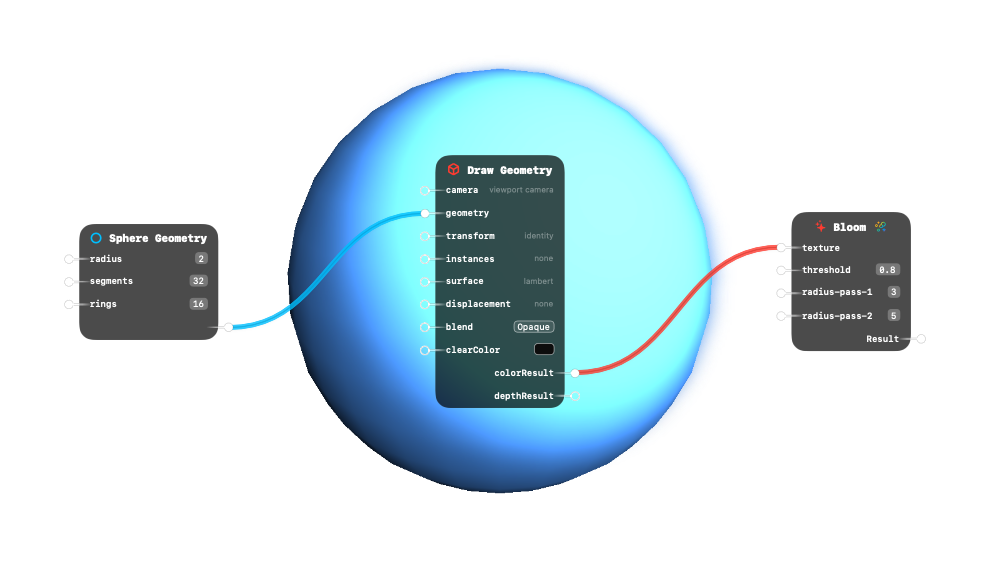
HDR bloom/glow effect. Extracts bright areas and blurs them for a glowing look.
Inputs:
| Name | Type | Default | Description |
|---|---|---|---|
| texture (required) | Visual Output | - | Source texture to apply bloom to |
| threshold | AudioStream / Boolean / RGB Color / RGBA Color / Option / Number / 2D Vector / 3D Vector / Float3x3 / 4D Vector / Transform Matrix / InstanceBuffer / Geometry / ParticleBuffer / String / Visual Output / UUID / VertexDisplacement | 0.80 | Brightness cutoff — pixels below this value don’t bloom |
| radius-pass-1 | AudioStream / Boolean / RGB Color / RGBA Color / Option / Number / 2D Vector / 3D Vector / Float3x3 / 4D Vector / Transform Matrix / InstanceBuffer / Geometry / ParticleBuffer / String / Visual Output / UUID / VertexDisplacement | 3.00 | Blur radius for the first blur pass (coarse glow) |
| radius-pass-2 | AudioStream / Boolean / RGB Color / RGBA Color / Option / Number / 2D Vector / 3D Vector / Float3x3 / 4D Vector / Transform Matrix / InstanceBuffer / Geometry / ParticleBuffer / String / Visual Output / UUID / VertexDisplacement | 5.00 | Blur radius for the second blur pass (fine glow) |
Outputs:
| Name | Type |
|---|---|
| Result | polymorphic |
Related: Blend Add, Blend Difference, Blend Exclusion, Blend Hard Light, Blend Multiply
 Brightness
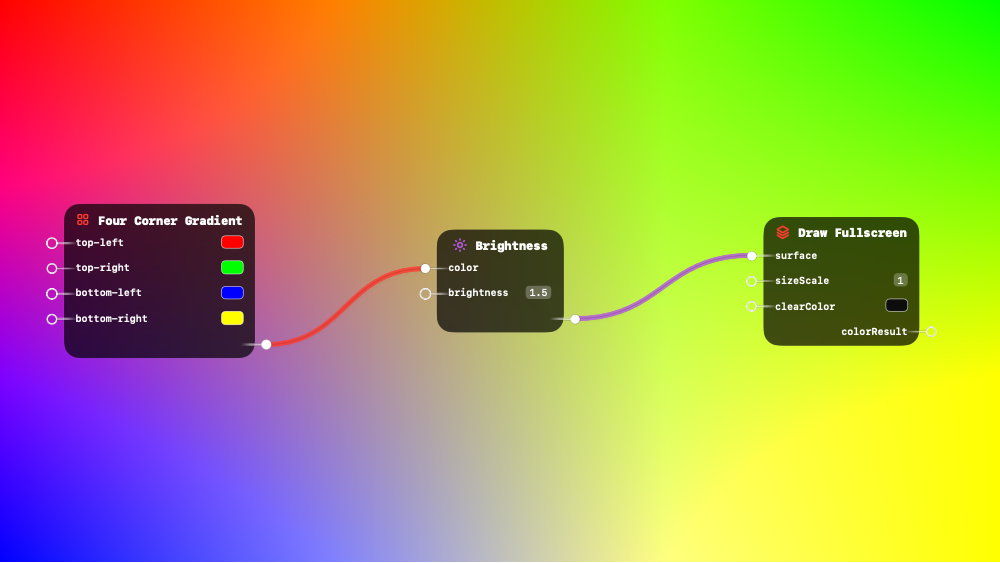
Scale color intensity. Values > 1 brighten, < 1 darken.
This is a surface shader node - it can be connected to rendering nodes.
Inputs:
| Name | Type | Default | Description |
|---|---|---|---|
| color | RGB Color / RGBA Color / 3D Vector / 4D Vector | white | Input color or texture to adjust |
| brightness | Number | 1.00 | Multiplier — 1 = unchanged, 2 = twice as bright, 0.5 = half |
Outputs:
| Name | Type | Description |
|---|---|---|
| result | polymorphic | Brightness-adjusted color |
Related: Blend Add, Blend Difference, Blend Exclusion, Blend Hard Light, Blend Multiply
 Chromatic Aberration
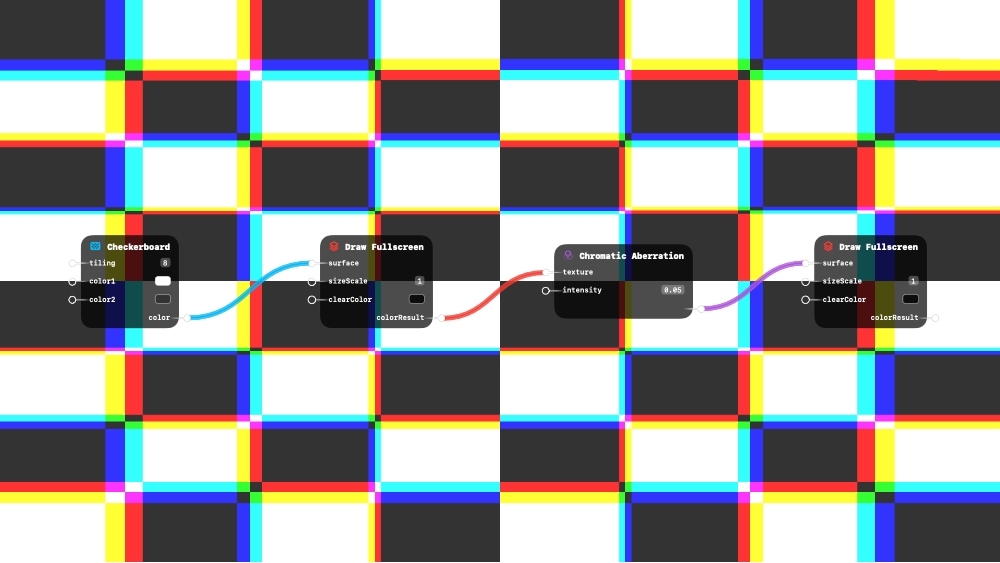
RGB channel separation. Creates broken lens or VHS aesthetic.
This is a surface shader node - it can be connected to rendering nodes.
Inputs:
| Name | Type | Default | Description |
|---|---|---|---|
| texture | RGB Color / RGBA Color / 3D Vector / 4D Vector / Visual Output | - | Source texture to distort |
| intensity | Number | 0.01 | Separation amount — small values (0.005–0.02) look best |
Outputs:
| Name | Type | Description |
|---|---|---|
| result | RGBA Color | RGB-separated result |
Related: Blend Add, Blend Difference, Blend Exclusion, Blend Hard Light, Blend Multiply
 Contrast
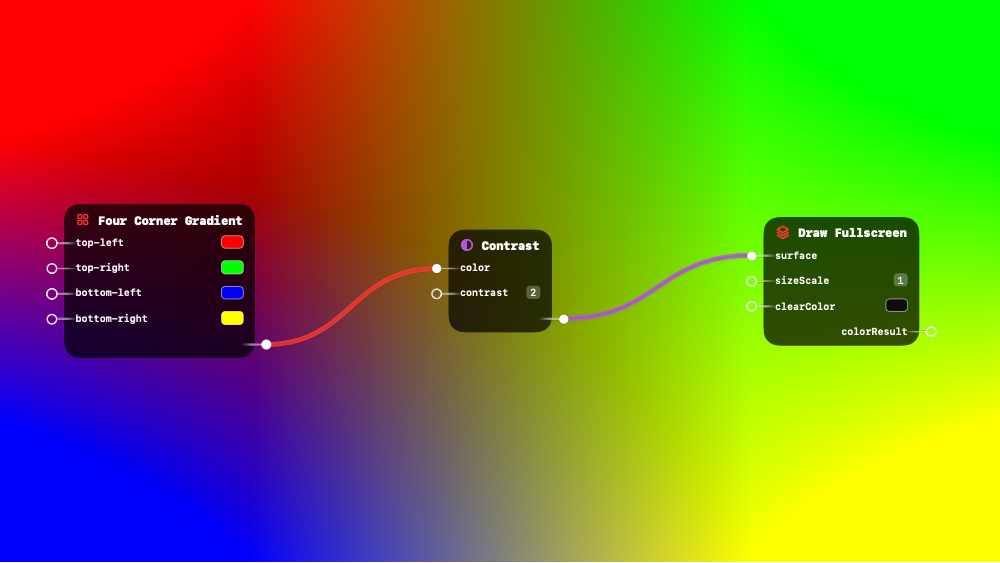
Adjust color contrast. Values > 1 increase, < 1 decrease.
This is a surface shader node - it can be connected to rendering nodes.
Inputs:
| Name | Type | Default | Description |
|---|---|---|---|
| color | RGB Color / RGBA Color / 3D Vector / 4D Vector | white | Input color or texture to adjust |
| contrast | Number | 1.00 | Multiplier — 1 = unchanged, > 1 = punchier, < 1 = flatter |
Outputs:
| Name | Type | Description |
|---|---|---|
| result | polymorphic | Contrast-adjusted color |
Related: Blend Add, Blend Difference, Blend Exclusion, Blend Hard Light, Blend Multiply
 Dither
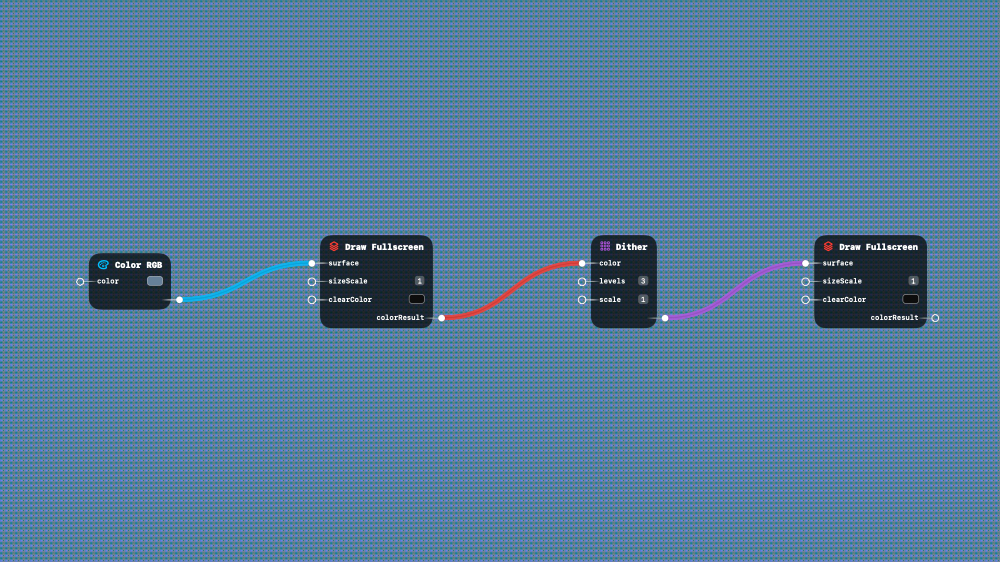
Bayer matrix ordered dithering. Works with textures or colors.
This is a surface shader node - it can be connected to rendering nodes.
Inputs:
| Name | Type | Default | Description |
|---|---|---|---|
| color | RGB Color / RGBA Color / 3D Vector / 4D Vector / Visual Output | white | Input color or texture to dither |
| levels | Number | 4.00 | Color quantization levels — fewer = more visible dithering |
| scale | Number | 1.00 | Dither pattern pixel size — larger = chunkier pattern |
Outputs:
| Name | Type | Description |
|---|---|---|
| result | RGBA Color | Dithered color with retro quantization |
Related: Blend Add, Blend Difference, Blend Exclusion, Blend Hard Light, Blend Multiply
 Edge Detect
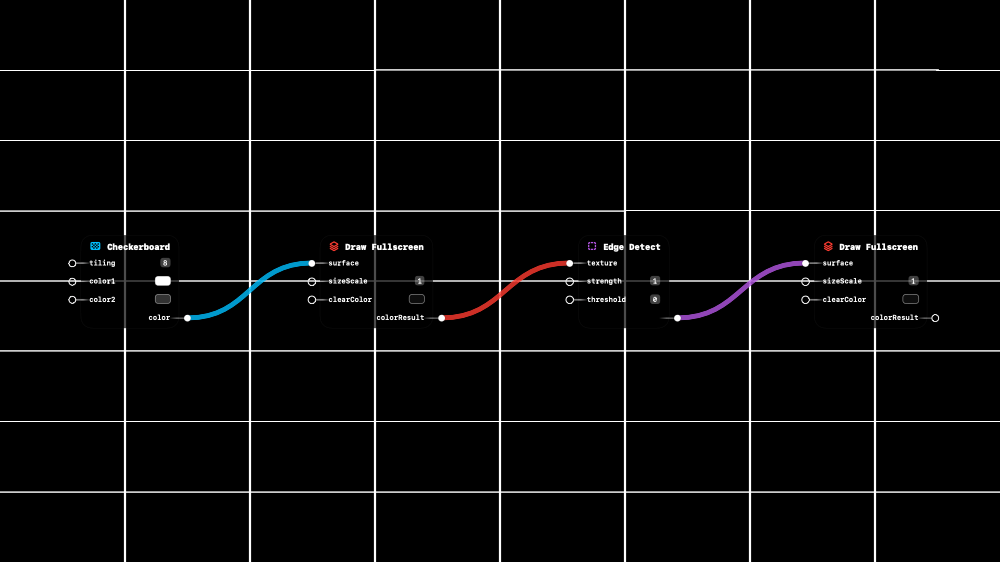
Sobel edge detection. Outputs edge strength for Tron/wireframe effects.
This is a surface shader node - it can be connected to rendering nodes.
Inputs:
| Name | Type | Default | Description |
|---|---|---|---|
| texture | RGB Color / RGBA Color / 3D Vector / 4D Vector / Visual Output | - | Source texture to detect edges in |
| strength | Number | 1.00 | Edge intensity multiplier |
| threshold | Number | 0.00 | Minimum edge strength to show — filters out weak edges |
Outputs:
| Name | Type | Description |
|---|---|---|
| result | RGBA Color | Grayscale edge map — white = edge, black = flat area |
Related: Blend Add, Blend Difference, Blend Exclusion, Blend Hard Light, Blend Multiply
 Feedback Texture
Provides the previous frame’s display output. Use for trails, motion blur, feedback effects, and recursive video loops.
This is a surface shader node - it can be connected to rendering nodes.
Inputs:
No inputs
Outputs:
| Name | Type | Description |
|---|---|---|
| previous | Visual Output | Last frame’s display output — one frame behind |
Related: Blend Add, Blend Difference, Blend Exclusion, Blend Hard Light, Blend Multiply
Fit
Aspect-ratio-aware display. Fill (crop to cover), Fit (letterbox), or Stretch.
This is a surface shader node - it can be connected to rendering nodes.
Inputs:
| Name | Type | Default | Description |
|---|---|---|---|
| source | RGB Color / RGBA Color / 3D Vector / 4D Vector / Visual Output | black | Source texture or color to fit |
| mode | Option | Fill (options: Fit, Fill, Stretch) | Fill = crop to cover, Fit = letterbox, Stretch = raw |
| sourceDimensions | 2D Vector | 1 | Auto-detected source dimensions |
Outputs:
| Name | Type | Description |
|---|---|---|
| result | polymorphic | Aspect-corrected result |
Related: Blend Add, Blend Difference, Blend Exclusion, Blend Hard Light, Blend Multiply
 FXAA
FXAA
Fast anti-aliasing. Smooths jagged edges in the final image.
Inputs:
| Name | Type | Default | Description |
|---|---|---|---|
| texture (required) | Visual Output | - | Rendered scene to anti-alias |
Outputs:
| Name | Type | Description |
|---|---|---|
| colorResult | Visual Output | Smoothed result with reduced aliasing |
Related: Blend Add, Blend Difference, Blend Exclusion, Blend Hard Light, Blend Multiply
 Gaussian Blur
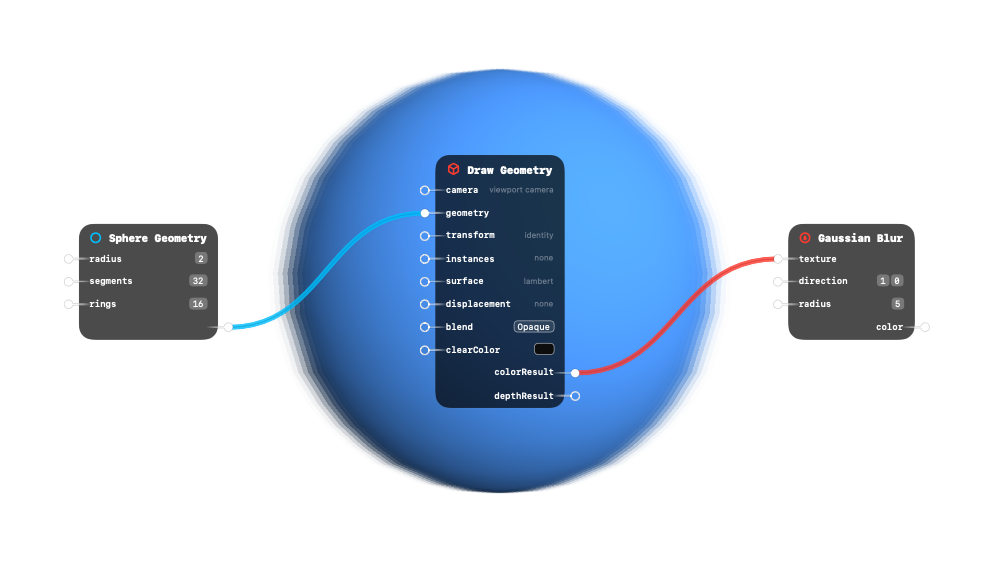
9-tap blur in one direction. Chain H + V passes for full 2D blur.
This is a surface shader node - it can be connected to rendering nodes.
Inputs:
| Name | Type | Default | Description |
|---|---|---|---|
| texture | RGB Color / RGBA Color / 3D Vector / 4D Vector / Visual Output | - | Source texture or color to blur |
| direction | 2D Vector | (1.00, 0.00) | Blur axis — (1,0) for horizontal, (0,1) for vertical |
| radius | Number | 3.00 | Blur spread in pixels — larger = softer |
Outputs:
| Name | Type | Description |
|---|---|---|
| color | RGBA Color | Blurred result along the specified direction |
Related: Blend Add, Blend Difference, Blend Exclusion, Blend Hard Light, Blend Multiply
 Grain
Grain
Film grain overlay. Adds hash-based noise for analog texture. Connect Time to seed for flickering grain.
This is a surface shader node - it can be connected to rendering nodes.
Inputs:
| Name | Type | Default | Description |
|---|---|---|---|
| texture | RGB Color / RGBA Color / 3D Vector / 4D Vector / Visual Output | - | Source image to add grain to |
| intensity | Number | 0.15 | Grain strength — 0 = none, 1 = very heavy |
| size | Number | 1.00 | Grain particle size — higher = coarser grain |
| seed | Number | 0.00 | Random seed — connect Time for animated flickering |
Outputs:
| Name | Type | Description |
|---|---|---|
| result | RGBA Color | Input image with grain overlay |
Related: Blend Add, Blend Difference, Blend Exclusion, Blend Hard Light, Blend Multiply
 Grayscale
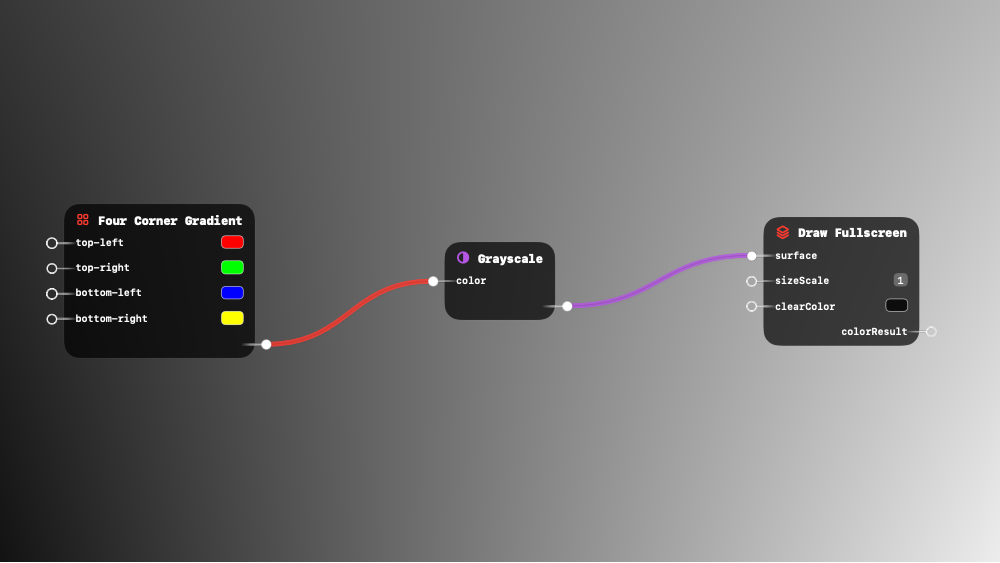
Convert color to grayscale using luminance weights.
This is a surface shader node - it can be connected to rendering nodes.
Inputs:
| Name | Type | Default | Description |
|---|---|---|---|
| color | RGB Color / RGBA Color / 3D Vector / 4D Vector | white | Color or texture to desaturate |
Outputs:
| Name | Type | Description |
|---|---|---|
| result | polymorphic | Grayscale result using perceptual luminance weights |
Related: Blend Add, Blend Difference, Blend Exclusion, Blend Hard Light, Blend Multiply
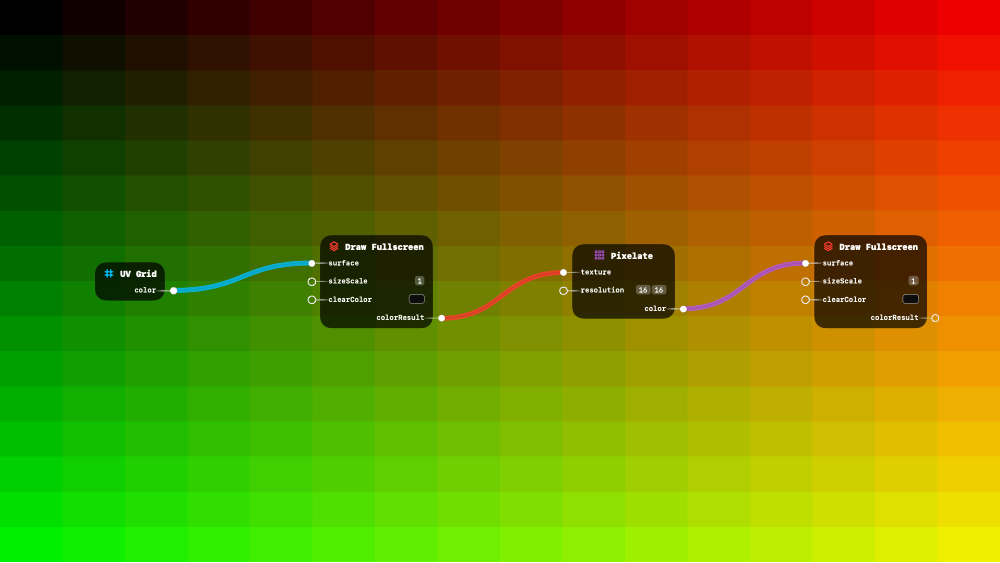
Pixelate
Retro pixelation effect. Resolution controls grid size (e.g., 32 = 32 pixels across).
This is a surface shader node - it can be connected to rendering nodes.
Inputs:
| Name | Type | Default | Description |
|---|---|---|---|
| texture | RGB Color / RGBA Color / 3D Vector / 4D Vector / Visual Output | - | Source texture or color to pixelate |
| resolution | 2D Vector | (64.00, 64.00) | Pixel grid size — lower = blockier (e.g., 16 = very chunky) |
Outputs:
| Name | Type | Description |
|---|---|---|
| color | RGBA Color | Pixelated result snapped to grid |
Related: Blend Add, Blend Difference, Blend Exclusion, Blend Hard Light, Blend Multiply
 Resolution
Rescale texture to different resolution. Use for performance (downscale) or quality (upscale with Lanczos).
Inputs:
| Name | Type | Default | Description |
|---|---|---|---|
| texture (required) | Visual Output | - | Source texture to rescale |
| scale | Number | 1.00 | Resolution multiplier — 0.5 = half size, 2.0 = double size |
| filter | Option | Bilinear (options: Bilinear, Lanczos) | Sampling filter — Lanczos is sharper for upscaling |
Outputs:
| Name | Type | Description |
|---|---|---|
| colorResult | Visual Output | Rescaled texture at the new resolution |
Related: Blend Add, Blend Difference, Blend Exclusion, Blend Hard Light, Blend Multiply
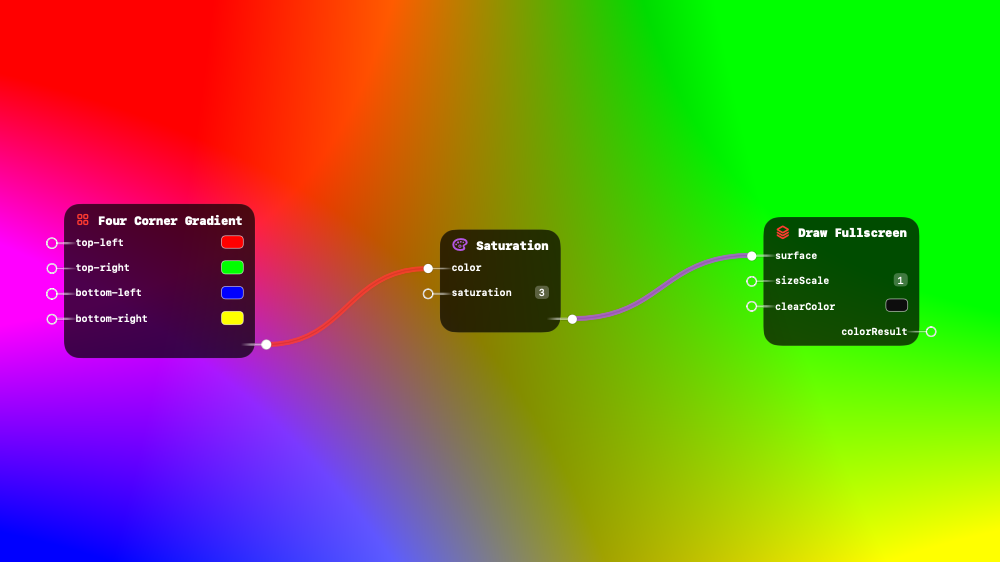
 Saturation
Adjust color saturation. 0 = grayscale, 1 = original, > 1 = vivid.
This is a surface shader node - it can be connected to rendering nodes.
Inputs:
| Name | Type | Default | Description |
|---|---|---|---|
| color | RGB Color / RGBA Color / 3D Vector / 4D Vector | white | Input color or texture to adjust |
| saturation | Number | 1.00 | 0 = fully gray, 1 = original color, > 1 = oversaturated |
Outputs:
| Name | Type | Description |
|---|---|---|
| result | polymorphic | Saturation-adjusted color |
Related: Blend Add, Blend Difference, Blend Exclusion, Blend Hard Light, Blend Multiply
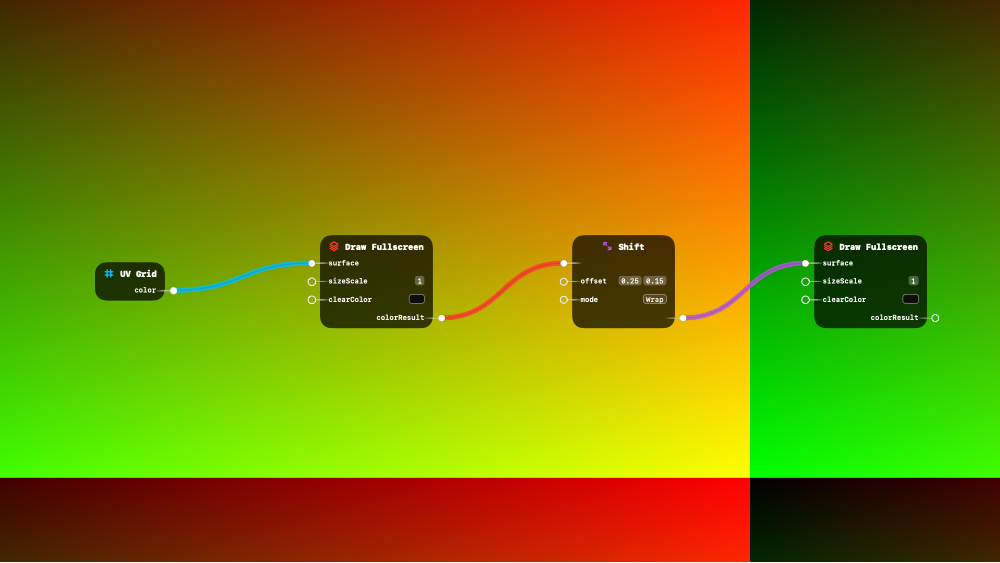
Shift
Translate texture by 2D offset. Wraps, clamps, mirrors, or blacks out edges.
This is a surface shader node - it can be connected to rendering nodes.
Inputs:
| Name | Type | Default | Description |
|---|---|---|---|
| input1 | RGB Color / RGBA Color / 3D Vector / 4D Vector / Visual Output | black | Texture or color to translate |
| offset | 2D Vector | (0.00, 0.00) | Translation in UV space — (0.5, 0) shifts half the screen right |
| mode | Option | Wrap (options: Wrap, Clamp, Mirror, Black) | Edge behavior — Wrap tiles, Clamp stretches, Mirror reflects |
Outputs:
| Name | Type | Description |
|---|---|---|
| result | polymorphic | Shifted result |
Related: Blend Add, Blend Difference, Blend Exclusion, Blend Hard Light, Blend Multiply
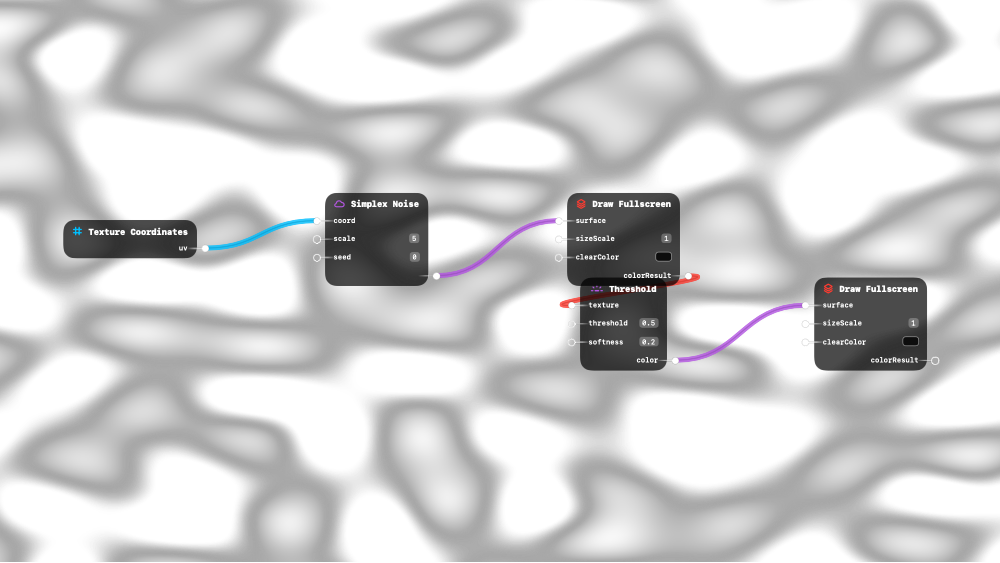
 Threshold
Extract bright areas above threshold. Essential for bloom extraction.
This is a surface shader node - it can be connected to rendering nodes.
Inputs:
| Name | Type | Default | Description |
|---|---|---|---|
| texture | RGB Color / RGBA Color / 3D Vector / 4D Vector / Visual Output | - | Source image or color to threshold |
| threshold | Number | 0.50 | Brightness cutoff (0–1) — pixels below this go black |
| softness | Number | 0.20 | Transition width — 0 = hard cutoff, higher = gradual fade |
Outputs:
| Name | Type | Description |
|---|---|---|
| color | RGBA Color | Bright areas only — dark areas become transparent black |
Related: Blend Add, Blend Difference, Blend Exclusion, Blend Hard Light, Blend Multiply
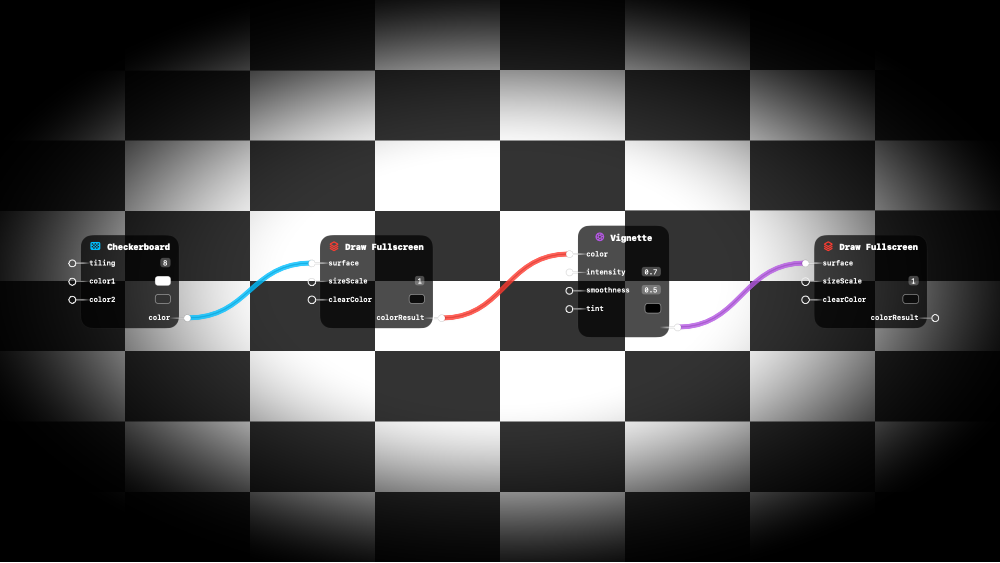
 Vignette
Blend frame edges toward a color. Works with textures or colors.
This is a surface shader node - it can be connected to rendering nodes.
Inputs:
| Name | Type | Default | Description |
|---|---|---|---|
| color | RGB Color / RGBA Color / 3D Vector / 4D Vector / Visual Output | white | Input color or texture |
| intensity | Number | 0.50 | How far the darkening extends from the edges |
| smoothness | Number | 0.50 | Transition softness — 0 = hard edge, 1 = gradual fade |
| tint | RGB Color / RGBA Color / 3D Vector / 4D Vector | RGB(0.00, 0.00, 0.00) | Edge tint color — black for classic vignette |
Outputs:
| Name | Type | Description |
|---|---|---|
| result | RGBA Color | Vignetted result with darkened edges |
Related: Blend Add, Blend Difference, Blend Exclusion, Blend Hard Light, Blend Multiply
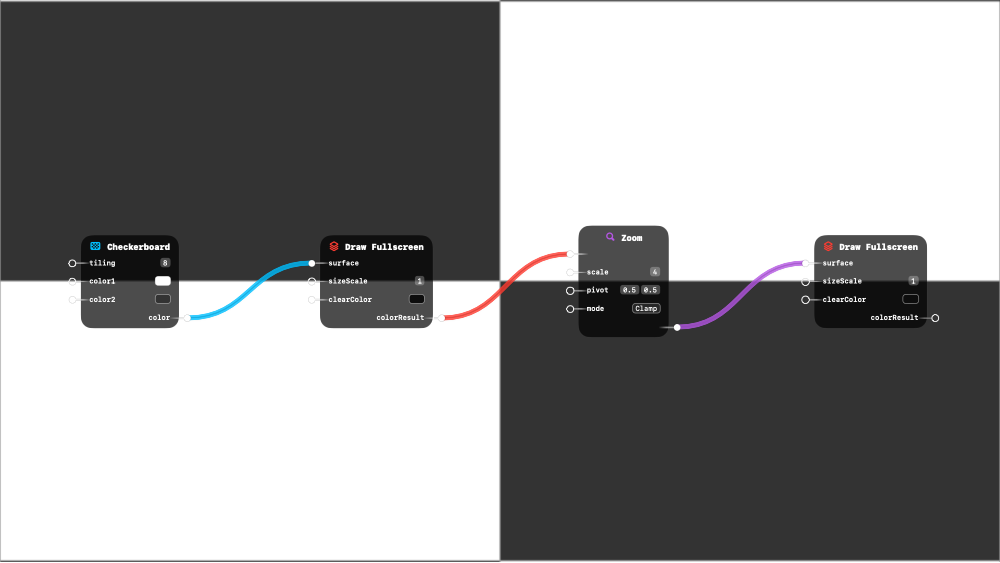
 Zoom
Zoom
Scale UV around pivot. >1 zooms in, <1 zooms out.
This is a surface shader node - it can be connected to rendering nodes.
Inputs:
| Name | Type | Default | Description |
|---|---|---|---|
| input1 | RGB Color / RGBA Color / 3D Vector / 4D Vector / Visual Output | black | Texture or color to zoom |
| scale | Number | 1.00 | Zoom factor — > 1 zooms in (crops), < 1 zooms out (shrinks) |
| pivot | 2D Vector | (0.50, 0.50) | Center point of the zoom in UV space |
| mode | Option | Clamp (options: Wrap, Clamp, Mirror, Black) | Edge behavior when zoomed out — Clamp, Wrap, or Mirror |
Outputs:
| Name | Type | Description |
|---|---|---|
| result | polymorphic | Zoomed result |
Related: Blend Add, Blend Difference, Blend Exclusion, Blend Hard Light, Blend Multiply